
Custom Search
Showing posts with label xp themes. Show all posts

Windows 7 Superbar in Windows XP.

This is a tutorial on how to get Windows 7 Superbar in Windows XP.
1. First download Winstep 8.11: [link]
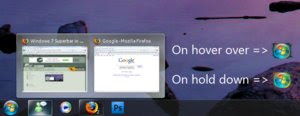
Windows 7 Superbar in Windows XP.
2. Right click on the taskbar on an application, go to Tasklist settings>Tasklist icon size>32 x 32.

2.5. If you want icon only(like in screenshot), right click again and go to Tasklist settings>click show icon labels which unchecks it.

3. Download my Windows 7 skin I created by clicking on the download link near top left of page.

4. Double click the file that you just downloaded.

5. If the theme doesn't open automatically after you double click on file, right click the arrow on the far right of the superbar>Themes>Windows 7

6. Go to the preferences by right clicking the icon in the toolbar and go to the 3rd tab. Make sure to change Task Grouping to Group Similar to get the effect shown in screenshot with 2 or more windows showing on hover over.

7. Enjoy


UPDATED:

- Changed taskbar colour

- CLOCK IS NOW WHITE! - Thanks go to jcrabbit

- Changed start buttons

- Changed taskbar buttons

- Made separators transparent

- Made taskbar buttons rectangular like the Windows 7 buttons


Please list any bugs,changes or improvements I can make on my skin.

Please give feedback on new taskbar colour. Is it better and/or is there a better colour for the taskbar?

Website

Read more...

Leopard Glass Final Only for XP

Leopard Glass Final Only for XP

MAke your XP look like a cool MAC OS leopard without any system files transformation.
Here is Leopard Glass windowblinds skin for XP

Include This Pack
---------------------------------
Leopard Glass WB skin (Compact SM, Full SM soon)
Leopard StylerTB
Leopard Grass Wallpaper

Download and enjoy !

DOWNLOAD

WEBSITE

Read more...

7 Plus Windowblinds XP skin

7 Plus Windowblinds XP skin

This skin is based on the new Windows 7 and Windows Vista, but it is a lot different from both of them in the most parts, I just tried to give it the style I wanted.

It works fine with Windows XP and Vista.

The wallpaper is in this link: [link]

The Dock you see in the preview is in this link: [link]

The Weather Gadget and the Calendar you see in the preview are in this link: [link]


DOWNLOAD 2MB

WEBSITE

Read more...

Make XP look like WINDOWS 7 easiest way

Make XP look like WINDOWS 7 easiest way

The windows 7 remix pack installer from NiwradSoft gives your Windows XP desktop a cool new Windows 7-ish look—without wasting time hacking system files yourself.

Why hack your system files individually and risk your OS instead of using a readymade software which transforms your XP to 7 in a few clicks?

Package includes boot screens, logon screens, screensaver, system theme, and hacked resource files.

Once you've installed and rebooted, your XP has a Windows 7 looking desktop, the fish wallpaper from the latest windows 7 beta build 7000. Your XP screenshot after install is below:
WIN 7 in XP
Download from Website

Read more...

Windows 7 Inspirat for XP

Windows 7 Inspirat for XP

This the Windows 7 Inspirat VS containing two shell styles, one bottom and one sideways, as shown above in the screenshot.

Windows 7 Inspirat for XP
PACK contains:
- Two themes with the two wallpapers.
- Styler theme
- ViOrb

Why dont you give it a try to make XP look like windows 7?

DOWNLOaD 2.1MB

website


| windows 7 final for Windowblinds XP | |

Read more...

Longhorn shellstyles for XP

Longhorn shellstyles for XP
Well after quite a short gap.. ONLYTHEMES is back... again onto XP theming with LONGHORN SHELLSTYLES FOR XP

longhorn style shellstyles I saw. They were originally made for Vista, but these are ported to XP.
Longhorn shellstyles for XP
There are 7 shellstyles inside:
Red
Light Red
Green
Light green
Purple
Grey
Blue
And 1 black styler toolbar to fit them all.

DOWNLOAD

website

Read more...

20 new shellstyles for xp


20 new shellstyles for xp

After a considerable gap we are again sharing with you, shellstyles for XP. Here is a Windows XP shellstyle Pack containing more than 20 colorful themes.

Hope you enjoy the shellstyles for XP.

Download
23.9MB

Website

Read more...

AeroGlassXP V2

AeroGlassXP V2

AeroGlassXP V2 is a windowblinds skin for XP.

It is a perfectly working windowblinds skin which makes XP look to have the aero effect!!
AeroGlassXP V2 has a perfectly working start menu with cool aero effect.
Also , the file animations dialog boxes appear exact.
Here given below is a preview of the skin.

aeroglass xp v2
download 5.3MB

Website

| elements of nature theme | leopard mods on xp |

Read more...

AeroMediaCenter 2008

AeroMediaCenter 2008

AeroMediaCenter 2008 is a windowblinds theme for XP.

AeroMediaCenter 2008 gives a cool greenish media center skin look for windows.
The image preview shown below gives a peek about the look of the skin.

aero media center skin windowblinds
download 4MB

Website

| midnight skin for XP and vista | aero longhorn XP|

Read more...

AeroMediaCenter 2008

AeroMediaCenter 2008

AeroMediaCenter 2008 is a windowblinds theme for XP.

AeroMediaCenter 2008 gives a cool greenish media center skin look for windows.
The image preview shown below gives a peek about the look of the skin.

download 4MB

Website

| midnight skin for XP and vista | aero longhorn XP|

Read more...

Windows Seven Final windowblinds XP

Windows Seven Final windowblinds XP

Windows Seven Final skin pack for windowblinds 6.0 on Windows XP
See the image below and the pack really gives a windows aero look for your XP.
Windows Seven Final windowblinds XP
The pack has 3 - shellstyles and 9 - colors

download 6MB

Website

| windows terranova for XP | windows 7 vista style final |

Read more...

Windows 7 ClearGlass windowblinds XP

Windows 7 ClearGlass


Windows 7 ClearGlass is a windowblinds skin for XP.


Now the world's waiting for a superb new OS, Windows 7 from Microsoft Corporation. There were many skinner trying to create their skin that match closer this new OS. I took about 2 month to create my own. And now, I want to share with you, my 5th skin in Window Blinds, "Windows 7 ClearGlass". Let me remind you that this skin only work 100% in Windows XP because XP is the only operating system I had & I use so don't ever trying to apply this skin in Windows Vista, it absolutely not work.

Download 2.6MB

Website

Read more...

Windows Seven Xp Aero beta 4

Windows Seven Xp Aero beta 4

Windows Seven Xp Aero beta 4 is a windowblinds theme for XP making your XP look like Windows 7.

This theme is a mod of Aero Seven by fediaFedia [link] , but inserted a Superbar imitation with original and animated PDC 2008 orb and original taskbar buttons.

The screenshot of the desktop shows the eye candy look of the theme pack.windows 7 aero xp beta windowblinds
So here under is the updated version of Windows Seven Xp Aero beta 4 pack. Start downlaoding

Download 2MB

Website

| windows 7 logon screen for XP | aero WINDOWS 7 theme for XP |

Read more...

W Seven XP for windowblinds

W Seven XP

W Seven Vista X-P is skin for Windowblinds in both Vista and XP.

The pack is updated on December 11 2008.W seven xp

W Seven XP pack is made for Windows Vista and XP. W Seven XP pack contains 6 styles in one. 3 for windows Vista and remaining 3 for Windows XP.

So Make your Windows look like Windows 7!!

Download 2.3MB

Website

| Windows 7 logon screen for XP | Windows 7 aero ultimate theme for XP |

Read more...

Windows Terra Nova 1.0

Windows Terra Nova 1.0 is a windowblinds skin for Windows XP.

The download pack contains:windows terra novaWindowblinds theme named Windows Terra Nova.wba and
Windows Dark Night Styler Toolbar (EXTRA)

Also the skin package includes the Windows Terra Nova Wallpaper.

So it is time to try this skin pack right now!!

Download 6.9MB

Website

| aero ultramarine XP | mac os X redux theme windowblinds XP |

Read more...

Aero Starry eyed for windowblinds XP

Aero Starry-eyed for windowblinds XP

Aero Starry-eyed WindowBlinds 5 Visual Style

*File: ASeWB.rar
(Includes: Aero Starry-eyed.wba, Segoe UI.ttf, Readme.txt and Aero Starry-eyed Styler ToolBar)
INSTALL THE FONT FIRST.
aero starry eyed windowblinds XP*Build 1205.0416.thememain.2006
+ Add 32 pixels Substyle.
+ Add Shellstyle Images.
+ New Startpanel (UserPicture frame, Shutdown and LogOff Image).
+ New Progress, Tool Buttons.
+ Fix bugs from previous build.

Download 1.8MB

website

| midnight for XP | leopard mods on XP |

Read more...

Blue Aero shellstyle for XP

BLUE AERO SHELL STYLE FOR XP

Here we share with you a BLUE AERO SHELL STYLE FOR XP

The shell style for XP contains a theme with blue borders on the top and bottom as shown in the preview...
It contains also a theme for styler as shown in the preview.blue aero shellstyle for xp


UPDATED: Styler toolbar

Please do give your valuable comments.... after downloading and testing this

Download
955KB

Website

| aero ultramarine for XP | whiteflame true aero3 for Xp |

Read more...

Aero UltraMarine windowblinds XP

Aero UltraMarine BETA for XP

This Skin is A BETA for WindowBlinds XP

see the preview of the theme given below...aero ultra marine Xp
It has a combination of Aero blue and golden colors on the buttons - the best part of the theme.

download 7.0MB

Website

| aero longhorn for xp | windows 7 aero ultimate theme |

Read more...

WhiteFlame True Aero 3 for WindowBlinds XP

WhiteFlame True Aero 3 for WindowBlinds XP only!

Needed Programs
whiteflame aero true 3
WindowBlinds*: [link]

Styler: [link]

Pack Contains

WhiteFlame Styler skin and WhiteFlame True Aero 3.

How to install

To install the WhiteFlame theme, extract WhiteFlame.wba to anywhere you want and double click on the file and it'll install!

To install the styler skin, extract the Style skin folder in WhiteFlame.rar and go into the folder and copy the WhiteFlame folder to C:\Program Files\Styler\TB\skins\Styler's.

How to get Copy File, Delete File, etc. animations working

First, open your WindowBlinds Configuration window by double clicking the WindowBlinds icon on your desktop, or right clicking the tray icon and click Configure WindowBlinds. Next, click on explorer animations. Then, click on the button where it says, 'Always use the animations defined in the current skin'. Then, click Apply. Now, copy a large file or delete some files or empty your recycling bin if you wish to test your new animations!

-------------------
Download 7.0MB

Website

| windows 7 prototype for XP | Midnight theme for XP and vista |

Read more...

Mac OSX Leopard Redux windowblinds XP

Mac OSX Leopard Redux windowblinds XP

Here are a collection of various items required for transforming your Windows XP to Mac OS X Leopard.
Mac OSX Leopard Redux windowblinds XP
The pack includes:
Windowblinds 6 OSX Leopard skin by blitzr (though a few other worthy versions are out there)

Objectbar: Used Tiger 10.4 skin

Styler: Aqua Extreme Tiger is the skin used for the window toolbar.

Dock: Rocketdock is my fav out of Objectdock and rkLauncher (the icons you see i made w/ "iReflector" to achieve the leopard dock look) and a stacks docklet is used which isn't officially supported for rocketdock but apparently it does not matter for it works flawlessly = )

Dashboard: Yahoo Widget Engine ("informer" widget is what is used to display all my System Info you see along the bottom of the desktop)

Window Transparencies: An app called "bLend" which is free and allows for full adjusting of window transparencies is used (only catch: better don't run when doing something full-screen--i.e. gaming, watching videos)

iTunes: using old version cuz multiplugin doesn't cover the newer ones.......with just the basic aqua skin that's supplied with multiplugin little things tweaked such as the BLUE LED info screen with the white apple logo and rounded out the top corners to match the rest of my windows' roundedness

So is not this worth trying?

Download 5.5MB

Website

| Aero Longhorn on XP | leopard mods on XP |

Read more...

About This Blog

About This Blog

ONLY THEMES is a blog which shares with you WINDOWS THEMES.

WINDOWS XP THEMES , VISTA THEMES , WINDOWS 7 CUSTOMIZATION etc.

  © Blogger template Newspaper III by Ourblogtemplates.com 2008

Back to TOP